

Calendar
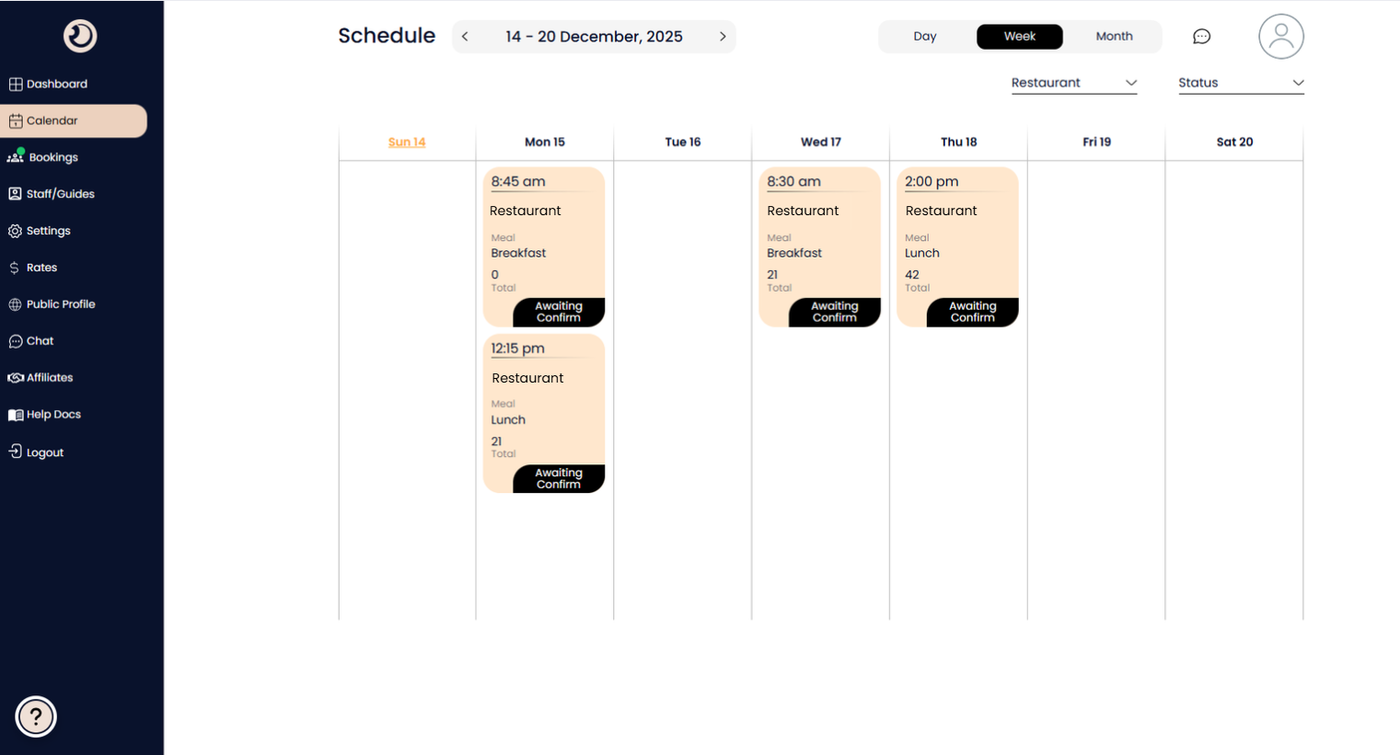
Calendar View
A timeline interface that allows you to track, manage, and visualize all bookings across days, weeks, or months to prevent conflicts and ensure smooth operations.
Date Navigation Bar:
Allows you to toggle between different time ranges (Day, Week, Month) or use the arrows to jump to past or future dates.
Filter Dropdowns (Restaurant & Status):
Helps you declutter the view by showing only bookings for a specific restaurant partner or specific booking statuses (e.g. "Confirmed" or "Awaiting Confirm").
Booking Card:
The individual block representing a reservation, displaying key snapshot details so you don't have to click into every single one.
Time Slot: The specific start time of the meal.
Restaurant: The logo and name of the dining partner.
Meal Type: Specifies if the booking is for Breakfast, Lunch, or Dinner.
Pax Count: Shows the total number of guests for that reservation.
Status Badge (e.g., "Awaiting Confirm"):
A label on the booking card indicating the current stage of the reservation (e.g., pending approval from the restaurant).