

Staff/Users
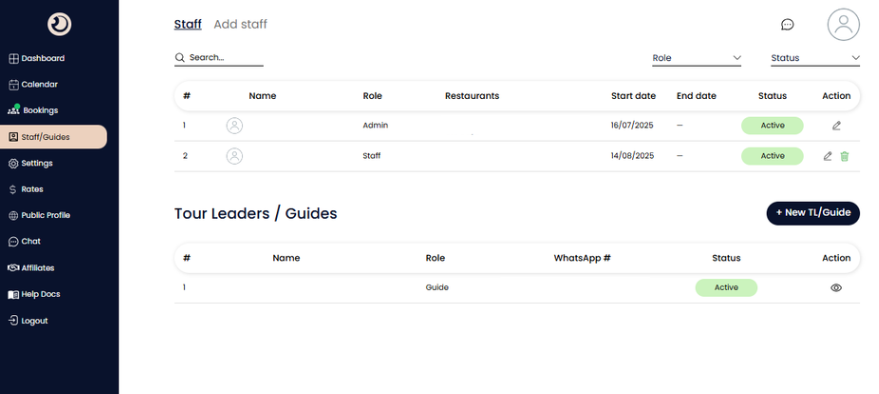
Staff & Guides Management Page
Function: The command center for managing your team roster. Use this page to onboard internal staff (who access the dashboard) and external Tour Leaders/Guides (who facilitate the guest experience).
Search & Filters:
Quickly locate a specific team member by name or filter the list by their "Role" (e.g., Admin vs. Staff) or "Status" (e.g., Active vs. Inactive).
Internal Staff List (Top Table):
Displays all office employees with dashboard access.
Role: Shows their permission level (e.g., Admin has full control, Staff may have limited access).
Start/End Date: Tracks employment duration or temporary contract validity.
Action Icons: Allows you to edit profile details (pencil icon) or remove the user (trash bin icon).
Tour Leaders / Guides Section (Bottom Table):
Specific section for managing field personnel who accompany guests.
+ New TL/Guide Button: Opens the registration form to add a new guide to your roster.
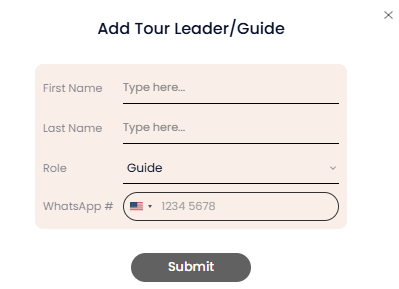
WhatsApp #: Displays the guide's contact number for quick coordination via the integrated chat or external messaging.

Add Staff Pop-up Window
The registration form used to create a new user account and define their specific permissions within the platform.
Personal Information Fields:
Standard fields (First Name, Last Name, Email) to identify the user and set up their login credentials.
Role Selection:
A dropdown to define the user's hierarchy (e.g., Manager, Reservation Agent, Accountant), which determines what they can see and do on the platform.
WhatsApp #:
The user's mobile number, critical for receiving automated notifications and urgent updates regarding bookings.
Restaurant to Assign:
A permission setting that allows you to link this specific staff member to only specific restaurant partners. This is useful if you have different agents handling different territories or cuisines.