

Schedule
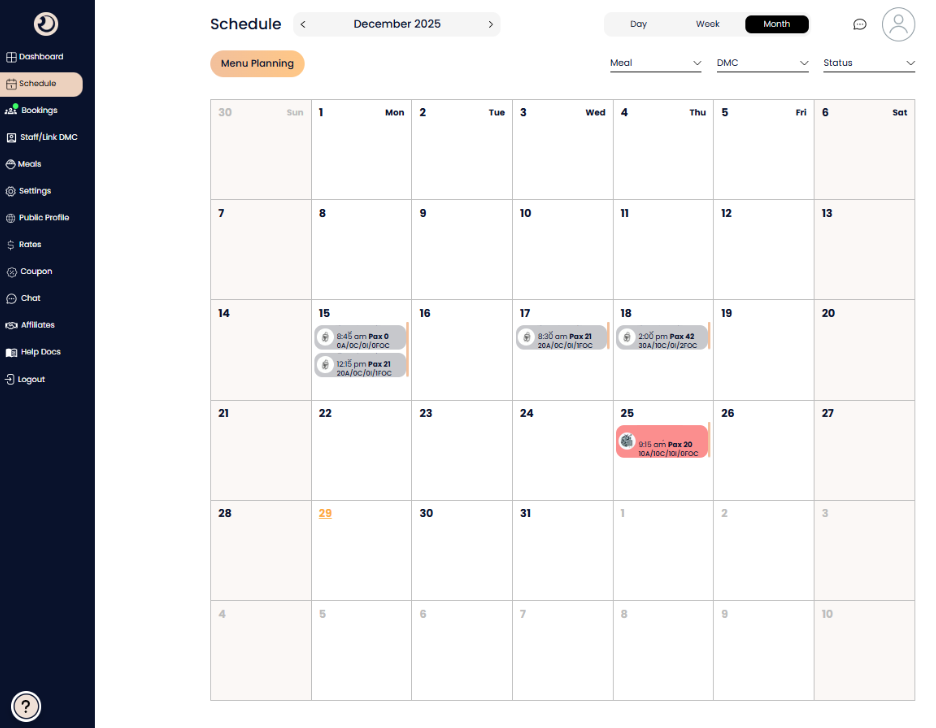
The Schedule interface allows you to visualize bookings across different timeframes and filter through specific criteria to ensure smooth operations.
Calendar Views & Navigation
At the top of the page, you can customize how you view your bookings:
Timeframe Toggles: Switch between Day, Week, and Month views to see immediate tasks or long-term planning.
Month Selector: Use the arrows next to the current month (e.g., December 2025) to navigate to past or future months.
Date Highlighting: The current day is highlighted in orange (e.g., the 29th) for quick reference.
Filtering Options
To find specific information quickly, use the dropdown menus located at the top right:
Meal: Filter by specific meal types (e.g., Breakfast, Lunch, Dinner).
DMC: View bookings associated with a specific Destination Management Company partner.
Status: Sort bookings by their current state, such as "Confirmed" or "To Confirm"
Understanding Calendar Entries
Each entry on the calendar provides a snapshot of the reservation details:
DMC Name: Identifies which partner made the booking.
Time & Pax: Displays the scheduled arrival time and the total number of guests (e.g., 9:15 am | Pax 20).
Breakdown Codes: View a detailed count of guest types (e.g., A for Adults, C for Children, I for Infants, and FOC for complimentary spots).
Status Colors: Visual cues indicate the booking status. For example, confirmed bookings appear in grey, while special alerts or specific statuses may appear in red.
Menu Planning & Kitchen Order Tickets (KOT)
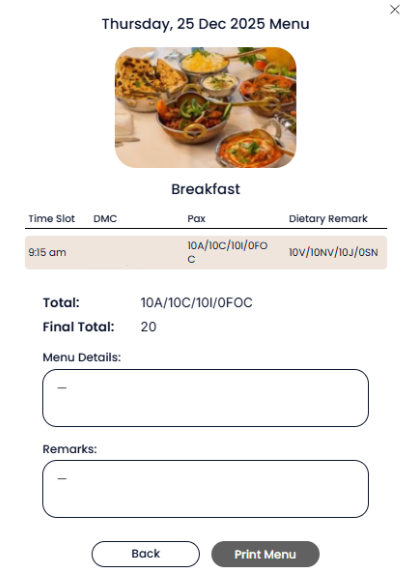
The Menu Planning button is a critical tool for your kitchen and floor staff.
Custom Notes: Clicking this button opens a popup where you can record specific menu requirements or special instructions for a particular booking.
Portable Printing: You can print these details directly to a portable printer.
KOT Format: The output is formatted as a Kitchen Order Ticket (KOT), providing the chef and staff with a clear, physical document showing the booking time and pax count for immediate action.