

Restaurant Bookings

Bookings Management View
The central hub for creating, monitoring, and modifying all restaurant reservations. It allows for both single entries and bulk management.
Tabs Navigation:
My Bookings: The current view showing a list of all reservations you have created.
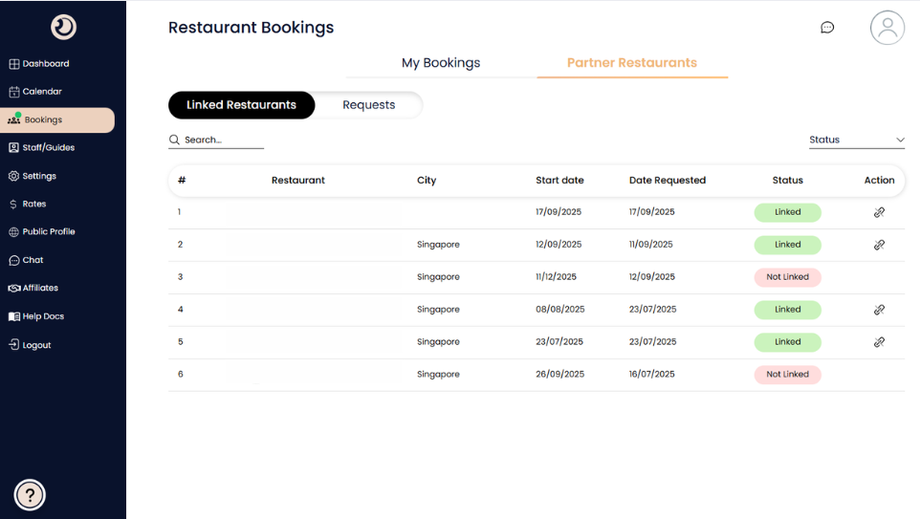
Partner Restaurants: Switches the view to a directory of all restaurants you are currently linked with, allowing you to manage relationships.

Search & Filter Bar:
Controls to refine the list view below.
Search: Find specific bookings by ID, restaurant name, or date.
Filters: Dropdowns to sort by "Active" (current vs. past), "Restaurant" (specific partner), "Status" (e.g., Awaiting Confirm), or "Sort by" (date/price).
+ New Booking Button: The primary action button to initiate a single reservation form or a bulk CSV upload.
Booking Card (List Item):
Detailed summary of a single reservation request.
Date & Time Block: Displays the scheduled date (e.g., "17 Dec Wed") and time (e.g., "8:30 am").
Restaurant Info: Shows the name of the venue.
Pax & Dietary Info: Lists the total guest count (e.g., "Total 21") and specific dietary codes (e.g., "20Adults/0Child/0Infant/1FreeOfCharge").
Chat & History Icons: Small icons next to the dietary info allowing you to open a direct chat about this specific booking or view its change log.
Financial & Status Panel (Right Side of Card):
Handles the business side of the booking.
Price: The total cost of the booking.
Status Badge: Indicates the current state, such as "Awaiting Confirm" (needs restaurant approval) or "Paid" (transaction complete).
Booking ID: Unique reference number (e.g., "#CHGO25129") for support and tracking.
Action Buttons:
Edit: Modify details like pax count or time.
View Details: Opens the full comprehensive view of a completed booking.
Receipt: Downloads the official proof of payment.