

Rates
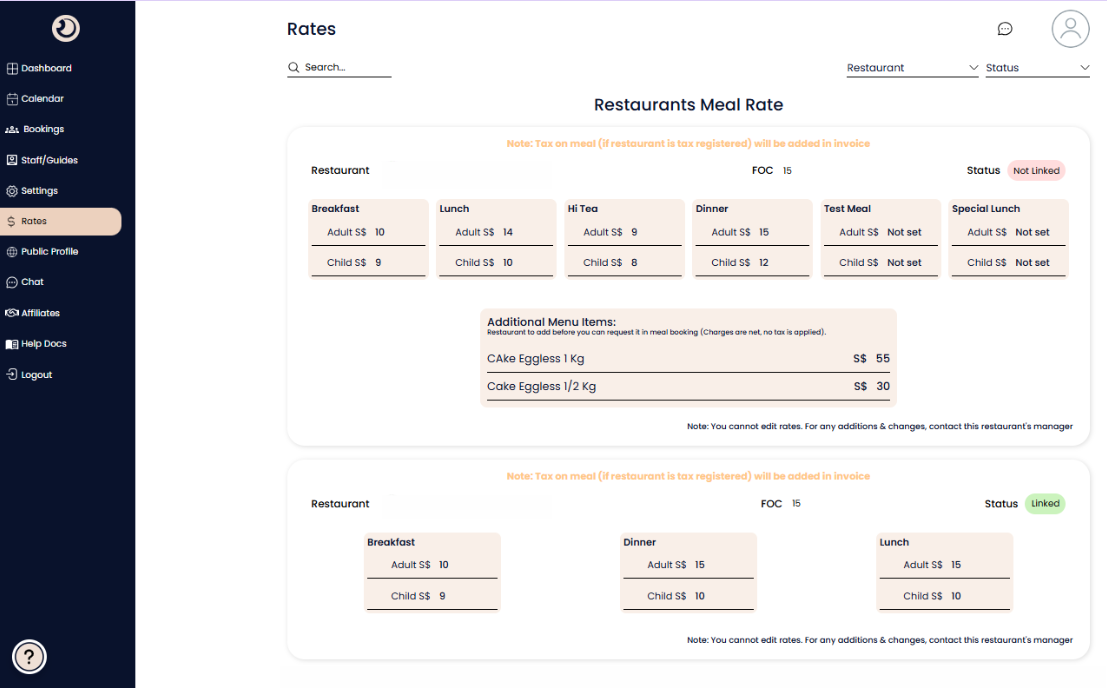
Rates Management Page
A centralized directory where DMCs can view the pre-negotiated meal rates and contract terms for all partner restaurants on the platform.
Search & Filter Bar:
Allows you to quickly find specific pricing information by searching for a restaurant name or filtering the list by connection status (e.g., Linked vs. Not Linked).
Restaurant Meal Rate Card:
A dedicated section for each restaurant showing their full pricing structure and contract details.
FOC (Free Of Charge) Ratio: Indicates the complimentary guest policy (e.g., "FOC 15" typically means one free meal is provided for every 15 paying guests).
Status Badge: Shows your current business relationship with the venue—Linked means you have an active contract, while Not Linked indicates a potential partner.
Meal Category Grid:
Displays the specific "Adult" and "Child" rates for different meal types, including Breakfast, Lunch, Hi Tea, Dinner, and special categories like Test Meals.
Rate Status: If a price is not yet agreed upon for a specific meal type, it will display as "Not set".
Additional Menu Items:
Lists extra services or products (such as celebratory cakes) that can be added to a booking, complete with specific weights and net charges.
Operational Notes:
Tax Notice: A reminder that applicable taxes will be added to the final invoice if the restaurant is tax-registered.
Edit Restriction: A security feature ensuring rate integrity; DMCs can view rates but cannot change them. Adjustments are handled by the Restaurant's manager.
Rates of a “Not Linked” restaurant would be visible due to prior linkage with the restaurant in the past.