

Navigation Sidebar
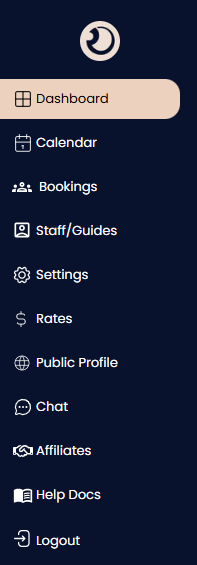
The central control panel that stays on the left side of your screen, allowing you to quickly switch between different tools and views within the application.
Dashboard: Your home screen providing a high-level snapshot of today's bookings, revenue stats, and urgent actions.
Calendar: A timeline view to visualize upcoming reservations, check availability, and manage your schedule at a glance.
Bookings: A comprehensive list view of all reservations where you can search, filter, and manage individual booking statuses.
Staff/Guides: Tools to manage your team members, add new user accounts, and assign specific roles or permissions.
Settings: The configuration center where you update company details, notification preferences, and account security.
Rates: A dedicated section to manage your pricing structures, seasonal rates, and negotiated B2B pricing terms.
Public Profile: Preview and edit how your business listing (photos, description, amenities) appears to partners on the network.
Chat: An integrated messaging tool for direct, secure communication with partners, replacing external apps like WhatsApp.
Affiliates: Manage your network of connected partners (DMCs or Restaurants) and view your relationship status with them.
Help Docs: Quick access to user guides, tutorials, and FAQs to assist you with using the platform.
Logout: Securely signs you out of your current session.